Sunday, February 17, 2008

Shortcut to implement methods and properties of Interface in inheriting class - C#

Whenever you create an Interface and implement in a class, you need to remember and override all methods or need to verify whether all methods/properties are impmenented. Using shortcut below you can implement all methods and properties of an Interface in inheriting class with click to three keys... i.e. "Alt+Shift+F10".

In the example below, I have created Interface with two methods and one property. While inheriting this interface in a class named "Test", you need to press "Alt+Shift+F10" on interface to implement all the methods and properties.


Press "Alt+Shift+F10" and press enter to implement all methods and properties.


Shortcut to add Namespace automatically while coding in class file - C#

While coding a class file, you might encounter situations where you come to know that namespace is missing and you need move to top of file and add a namespace by "using" keyword.

e.g. you are writing a DAL (Data Access Layer) and have to create a variable of "SqlDataReader". Suddenly you recognize that "System.Data.SqlClient" is missing (its a pain sometimes..). In this case you need to move top and type there.

Below is the shortcut for this problem. Taking above example, type SqlDataReader and press "Alt+Shift+F10" and press enter to create a namespace automatically.
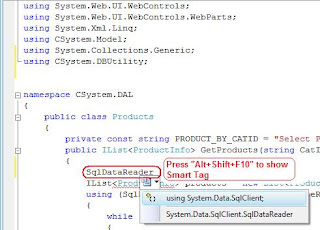


Press "Alt+Shift+F10" to show Smart Tag and press enter to select first option.
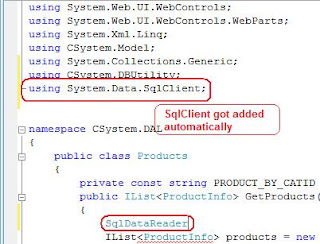


You see, "System.Data.Sqlclient" got added without going and typing it...


Let me know your comments..

Shortcut to load MS Visual Studio faster

There is a way to load MS Visual Studio 2005 or 2008 IDE faster than ever to save your time. There is always some time involved in loading IDE but using the command below you can load IDE faster.

Type the command in your Run dialog:
devenv /nosplash

Happy Coding!!!

HEROES happen {here} registration open for Bangalore, Mumbai and Delhi

Registration for "HEROES happen {here}" event is open for Bangalore, Mumbai and New Delhi. Microsoft is celebrating the launch of Windows Server 2008, Visual Studio 2008 and SQL Server 2008. The event will bring together IT Pro's and Developers in your city to get an in-depth, up-close look at the new products and will give attendees an opportunity to meet with Microsoft employees and Partners who have been working on these new products.

Hurry and resigter yourself from link below:
http://heroeshappenhere.co.in/Register.aspx

OR

Bangalore - 4-March-2008
http://msevents.microsoft.com/CUI/EventDetail.aspx?EventID=1032366983&Culture=en-IN

Mumbai - 5-March-2008
http://msevents.microsoft.com/CUI/EventDetail.aspx?EventID=1032366992&Culture=en-IN

Delhi - 6-March-2008
http://msevents.microsoft.com/CUI/EventDetail.aspx?EventID=1032366996&Culture=en-IN


Hurry and reserve fast, as there are limited seats and get your FREE GIFT!!

Tuesday, January 22, 2008

Dot Net Videos

Wanna learn Dot Net from scratch to intermediate level... Reading from books would take too much of time and there are many vidoe sites I have seen on net including microsoft (http://asp.net/learn), but this one I have found a bit useful and sharing the link below:

http://www.dotnetvideos.net

Videos range from creating DAL layers, business logic layer, reporting, paging and sorting, acessing database to working with binary files, caching, working with batch data...

In order to view the videos, you need to register yourself and for timebeing its free, so go ahead and register yourself and start dot net...

Happy learning and let me know your comments....

Monday, April 16, 2007

Read Excel with C# ADO.NET

Today I got a customer requirement where they had requirement to display data from Excel to their Web Site. I had done this with other earlier versions (ASP, VB), but never tried with .NET.

I thought this to be very difficult and might took enough time to fetch and display the data on site. This can be done easily through ADO.NET in very simpler way by manipulating the ConnectionString.

Below is the code snippet:


Thanks...


Sunday, April 8, 2007

Read XML in Dataset with C#

Instead of using looong approach to open, read and parse XML, I prefer reading XML with Dataset and process as required. Reading through Dataset will load all data into DataTable and DataRow and can be parsed as reqd.

Using the standard way to read XML (see other articles in blog for reading XML with recommended method) might be good, but remembering long and many lines of code to read and parse is again tedious.

Below is the code snippet:


Thanks...