This is an amazing open source on-the-fly disk encryption software for Windows, Mac and Linux. You can encrypt entire disk (internal/external/USBs) as well as encrypt any files/folders into encrypted file which can be mounted later.
TrueCrypt has an fantastic feature of two levels of encryption which helps to protect the volume in case if you have to reveal the password. In this case he creates a Hidden Volume which will never be known to others and opened with another password. It uses Encryption Algorithm such as AES-256, Serpent, Twofish and mode of operation is XTS
Advantage is you don't need to decrypt every files/folders to view it. You just have to mount with correct password and it operates as normal volume.
Only disadvantage is that IF YOU FORGET THE PASSWORD, YOU WILL LOOSE ALL DATA.
READ THE DOCUMENTATION AND TUTORIAL BEFORE INSTALLING...
URL to site: http://www.truecrypt.org/
Download: http://www.truecrypt.org/downloads
Docs: http://www.truecrypt.org/docs/
Saturday, March 21, 2009


Thursday, February 12, 2009
Deleting Services Forcefully from Services MMC
Few days back I modified my Windows Service .NET Application and compiled to MSI to be re-installed. Somehow during un-install process, service was not removed from Services Microsoft Management Console (MMC) and it came to my notice during re-installation of MSI.
As there is no Delete option available in Services MMC, it was becoming a nightmare to re-install it. Some how I found SC.EXE which is a command line program to communicate with Service Control Manager and Services.
There are many available options but what interested me is you can Create, Start, Stop, Delete a service with a Command Line.
Starting a Service:
sc.exe start PaymentCalculationService
Stopping a Service:
sc.exe stop PaymentCalculationService
Deleting a Service:
sc.exe delete PaymentCalculationService
Hope this helps for similar problems...
As there is no Delete option available in Services MMC, it was becoming a nightmare to re-install it. Some how I found SC.EXE which is a command line program to communicate with Service Control Manager and Services.
There are many available options but what interested me is you can Create, Start, Stop, Delete a service with a Command Line.
Creating a Service:
sc.exe create PayCalcService binPath= "C:\Program Files\PaymentCalculation\paycalc.exe" DisplayName= "PaymentCalculationService"Starting a Service:
sc.exe start PaymentCalculationService
Stopping a Service:
sc.exe stop PaymentCalculationService
Deleting a Service:
sc.exe delete PaymentCalculationService
Hope this helps for similar problems...
Monday, February 18, 2008
Shortcut to create Property out of Field - C#
To create Property out of Field, you need to declare a field as private and create Property for the field. But now you can create Property out of Field with combination of three keys. Yeah..., its Ctrl+R+E.


Declare the field as private and press "Ctrl+R+E" on the field name. It will popup a dialog where you can set the name of property (its almost what you want). Click OK to create Property in your C# code.

Property gets created automatically on click of OK

Sunday, February 17, 2008
Shortcut to implement methods and properties of Interface in inheriting class - C#
Whenever you create an Interface and implement in a class, you need to remember and override all methods or need to verify whether all methods/properties are impmenented. Using shortcut below you can implement all methods and properties of an Interface in inheriting class with click to three keys... i.e. "Alt+Shift+F10".
In the example below, I have created Interface with two methods and one property. While inheriting this interface in a class named "Test", you need to press "Alt+Shift+F10" on interface to implement all the methods and properties.

Press "Alt+Shift+F10" and press enter to implement all methods and properties.

In the example below, I have created Interface with two methods and one property. While inheriting this interface in a class named "Test", you need to press "Alt+Shift+F10" on interface to implement all the methods and properties.

Press "Alt+Shift+F10" and press enter to implement all methods and properties.

Shortcut to add Namespace automatically while coding in class file - C#
While coding a class file, you might encounter situations where you come to know that namespace is missing and you need move to top of file and add a namespace by "using" keyword.
e.g. you are writing a DAL (Data Access Layer) and have to create a variable of "SqlDataReader". Suddenly you recognize that "System.Data.SqlClient" is missing (its a pain sometimes..). In this case you need to move top and type there.
Below is the shortcut for this problem. Taking above example, type SqlDataReader and press "Alt+Shift+F10" and press enter to create a namespace automatically.
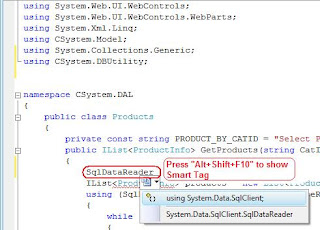
Press "Alt+Shift+F10" to show Smart Tag and press enter to select first option.
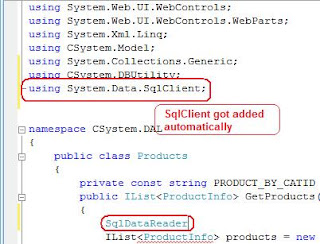
You see, "System.Data.Sqlclient" got added without going and typing it...
Let me know your comments..
e.g. you are writing a DAL (Data Access Layer) and have to create a variable of "SqlDataReader". Suddenly you recognize that "System.Data.SqlClient" is missing (its a pain sometimes..). In this case you need to move top and type there.
Below is the shortcut for this problem. Taking above example, type SqlDataReader and press "Alt+Shift+F10" and press enter to create a namespace automatically.

Press "Alt+Shift+F10" to show Smart Tag and press enter to select first option.

You see, "System.Data.Sqlclient" got added without going and typing it...
Let me know your comments..
Shortcut to load MS Visual Studio faster
There is a way to load MS Visual Studio 2005 or 2008 IDE faster than ever to save your time. There is always some time involved in loading IDE but using the command below you can load IDE faster.
Type the command in your Run dialog:
devenv /nosplash
Happy Coding!!!
Type the command in your Run dialog:
devenv /nosplash
Happy Coding!!!
HEROES happen {here} registration open for Bangalore, Mumbai and Delhi
Registration for "HEROES happen {here}" event is open for Bangalore, Mumbai and New Delhi. Microsoft is celebrating the launch of Windows Server 2008, Visual Studio 2008 and SQL Server 2008. The event will bring together IT Pro's and Developers in your city to get an in-depth, up-close look at the new products and will give attendees an opportunity to meet with Microsoft employees and Partners who have been working on these new products.
Hurry and resigter yourself from link below:
http://heroeshappenhere.co.in/Register.aspx
OR
Bangalore - 4-March-2008
http://msevents.microsoft.com/CUI/EventDetail.aspx?EventID=1032366983&Culture=en-IN
Mumbai - 5-March-2008
http://msevents.microsoft.com/CUI/EventDetail.aspx?EventID=1032366992&Culture=en-IN
Delhi - 6-March-2008
http://msevents.microsoft.com/CUI/EventDetail.aspx?EventID=1032366996&Culture=en-IN
Hurry and reserve fast, as there are limited seats and get your FREE GIFT!!
Hurry and resigter yourself from link below:
http://heroeshappenhere.co.in/Register.aspx
OR
Bangalore - 4-March-2008
http://msevents.microsoft.com/CUI/EventDetail.aspx?EventID=1032366983&Culture=en-IN
Mumbai - 5-March-2008
http://msevents.microsoft.com/CUI/EventDetail.aspx?EventID=1032366992&Culture=en-IN
Delhi - 6-March-2008
http://msevents.microsoft.com/CUI/EventDetail.aspx?EventID=1032366996&Culture=en-IN
Hurry and reserve fast, as there are limited seats and get your FREE GIFT!!
Subscribe to:
Posts (Atom)